

Hotel rooms, gym memberships and repair status
Some stores on SmartPOS Hub are hotels, gyms or repair shops. In SmartPOS Shopper you can book a hotel room, join or renew a gym membership and book classes, or follow a device repair from drop-off to pickup. These screens only appear at stores that run them; this page explains each one.
Book a hotel room
Section titled “Book a hotel room”- Tap Book a room on the hotel’s Home.
- Under Your stay, set the check-in and check-out dates (Change to edit), Adults and Children.
- Browse Rooms: photos, From a price a night, how many are left, and who fits (Up to 2 adults).
- Tap Reserve on a room. Check the price per night, discount, tax and total, read Good to know (check-in from, check-out until, photo ID, minimum age) and add Special requests.
- Tap Send reservation. You see Sent! The hotel will confirm your reservation.
Under My stays you see each stay with its status: Waiting for the hotel, Confirmed, Checked in, Checked out, Cancelled, No-show or Cancellation asked, plus Total, Paid and To pay.
To cancel: a stay the hotel hasn’t confirmed yet → Cancel reservation (free, at once). A confirmed stay → Ask to cancel; the hotel decides about any fee and gets back to you.
Gym memberships and classes
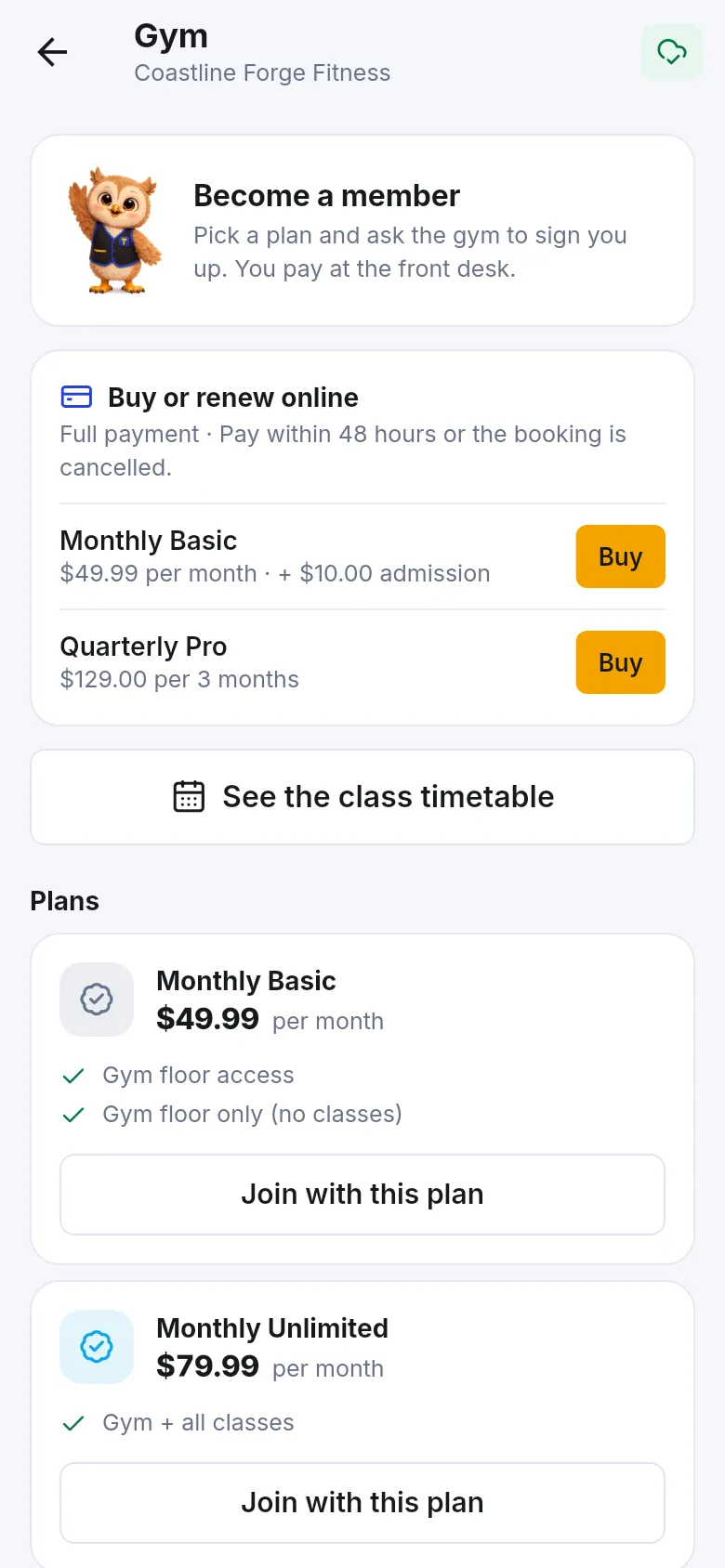
Section titled “Gym memberships and classes”- Tap Gym on the gym’s Home.
- Not a member yet? Under Plans pick a plan and tap Join with this plan. Members see Renew your membership and Renew with this plan.
- Add a Note for the gym (optional) and tap Send request. “The gym gets your request and signs you up. You pay at the front desk.”
- Some gyms show Buy or renew online: tap Buy or Renew next to a plan, then Continue to payment, and pay in the app (see pay to confirm).
- Tap See the class timetable, pick a day and tap Book on a class (spots left are shown; Full classes can’t be booked).
- Your booked classes are under My classes. Tap Cancel → Yes, cancel to free your spot.
- Only members can book classes, and some plans are Gym floor only (no classes).
Tap Check in on Home or Show my check-in code, and show the code at the front desk scanner. The gym screen also shows your Membership status (Active, Ends soon, Paused, Expired…), days left and Visits used.
Follow a repair
Section titled “Follow a repair”- Tap Repair status on the shop’s Home. Your jobs are listed under In progress and Finished.
- Not linked to your account? Tap Track a job, enter the Job number from your claim ticket and the Last 4 phone digits or e-mail, then Find my repair.
- Open a job to see Progress, the Problem, Costs, Deposit paid and the date Expected.
- When the shop sends an estimate, you see Waiting for your answer. Tap Approve or Decline.
- When the banner says your device is ready for pickup!, bring your claim ticket or show the screen.
To ask for a repair first, tap Request a repair: choose the Device type, Brand, Model (optional), describe What’s wrong?, add Photos and pick When would you like to bring it in?, then Send request. “This is a request, not a booking” — the shop replies and writes the job sheet when you bring the device. Replies show under My requests.
Frequently asked questions
Section titled “Frequently asked questions”Do I pay for a hotel room in the app?
Usually not. The room screen says You pay at the hotel, and your reservation arrives at the hotel as a request it confirms. If the hotel asks for a deposit in the app, you see Pay to confirm instead and can pay online or by transfer.
How do I cancel a hotel reservation?
Open My stays and the stay. If the hotel hasn't confirmed it yet, tap Cancel reservation and it is cancelled at once, free of charge. If it is already confirmed, tap Ask to cancel; the hotel decides about any fee under its rules and gets back to you.
Can I buy a gym membership in the app?
It depends on the gym. Some gyms show Buy or renew online, where you pay in the app. Otherwise you pick a plan and tap Join with this plan or Renew with this plan; the gym gets your request and you pay at the front desk.
How do I check in at the gym?
Open the gym's Home and tap Check in, or Show my check-in code on the gym screen. Show the code at the front desk scanner. It only works while your membership is active.
How do I track my repair without an account at the shop?
Tap Track a job and enter the job number from your claim ticket plus the last 4 digits of your phone number or your e-mail. You see the progress; prices and notes are only shown to the customer of that job.
The repair shop sent an estimate. What do I do?
Open the repair and read the estimate. Tap Approve if the shop should go ahead at that price, or Decline to collect the device as it is. If the app says to answer at the shop or by phone, do that instead.